Retirement planning, engineered for precision.
Hey, it’s Kelby.
After retiring, I started working on a passion project: A retirement planning tool to help me visualize how small choices affect big-picture outcomes.
I’m a hack musician, so I envisioned something like a recording studio that would enable me to fine-tune my retirement the way I would mix a song — add a little here, take out a little there, and dial it in until it sounds right.
Three years later, I finished building Rock My Retirement. I hope you’ll find it as helpful as I have.
The first thing you’ll notice about Rock My Retirement is that the user interface doesn’t look like your tax planning software. There are no drop-down menus, text entry boxes, or encyclopedia-like help files. Instead, it’s like using vintage analog equipment — turning knobs, sliding faders, and flipping switches while you watch your retirement take shape. It will make your retirement planning adventure fun, calming, and clear. (And yes, for those who prefer “less fun,” you can double-click most of the knob displays to type numbers rather than turning the knob. Shame on you for being boring.)
But don’t let the playful interface fool you. Under the hood, Rock My Retirement is engineered for serious analysis. It stress-tests your plans against up to 100,000 Monte Carlo simulations, estimates your taxes and Social Security for every year in every scenario, and uses a genuine optimization algorithm — not a chatbot — to learn which strategies work best for your specific situation.
Rock My Retirement gives you fine control over your retirement plans, so you can get as granular as you want. Choose how you will manage different expenses during different phases of your retirement, and how flexible you will be with each expense during market downturns. Plan contingencies if your assets don’t meet a target by your retirement date. Set withdrawal strategies, reinvestment strategies, and Roth conversion strategies. And with every turn of a knob, Rock My Retirement will do all the hard math behind the scenes — calculating every aspect of your budget for every year in every scenario, as well as your asset growth, estimated taxes, Social Security benefits, and swaths of other details.
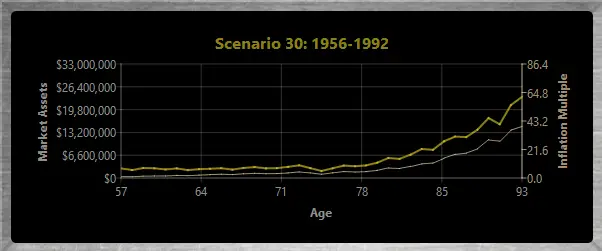
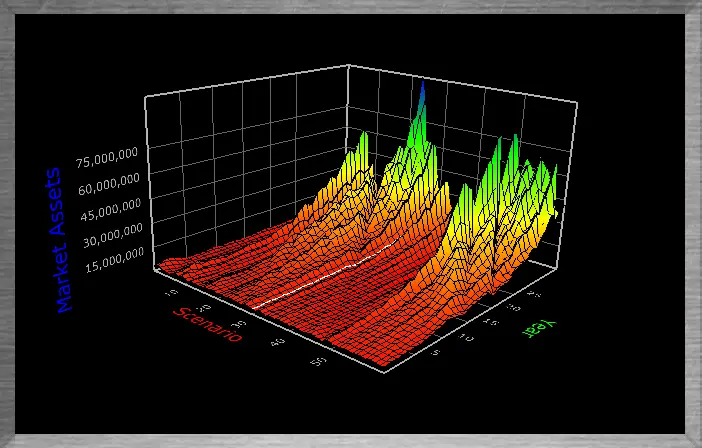
And here’s where Rock My Retirement turns it up to eleven. Many retirement planning tools overwhelm you with mind-numbing volumes of numbers and bar charts. You may have even built a spreadsheet with countless cells that make your eyes glaze over. But Rock My Retirement has sophisticated data visualization tools that show you the big picture graphically, so you’ll see how any change impacts your future without having to look at a single number. Of course, there’s a standard line graph that displays how your retirement would play out in a given simulation. But there’s also a 3D graph (a “surface plot”) that shows how your retirement would play out in all historical simulations at once, so you can see the forest despite all the trees. It will empower you to prepare your retirement for all conditions. It will give you confidence in when and how to retire.
Rock My Retirement also includes a Monte Carlo engine that runs up to 100,000 simulations to stress-test your retirement plans. And while most retirement planning tools stop there — leaving you to experiment by hand — Rock My Retirement goes further. Its AI Optimization Engine uses a real optimization algorithm that learns which strategies work for your situation. It doesn’t just show you how a plan performs. It helps you find a better one.
It’s powerful. It’s fun. It’s your personal mixing board for the future.
Retro vibe outside, rocket science inside.
Rock My Retirement bundles a host of sophisticated retirement planning features in a simple, vintage package. Some key features include:
- Detailed expense planning.
Rock My Retirement makes it easy to plan your expenses the way you’ll handle them in the real world.
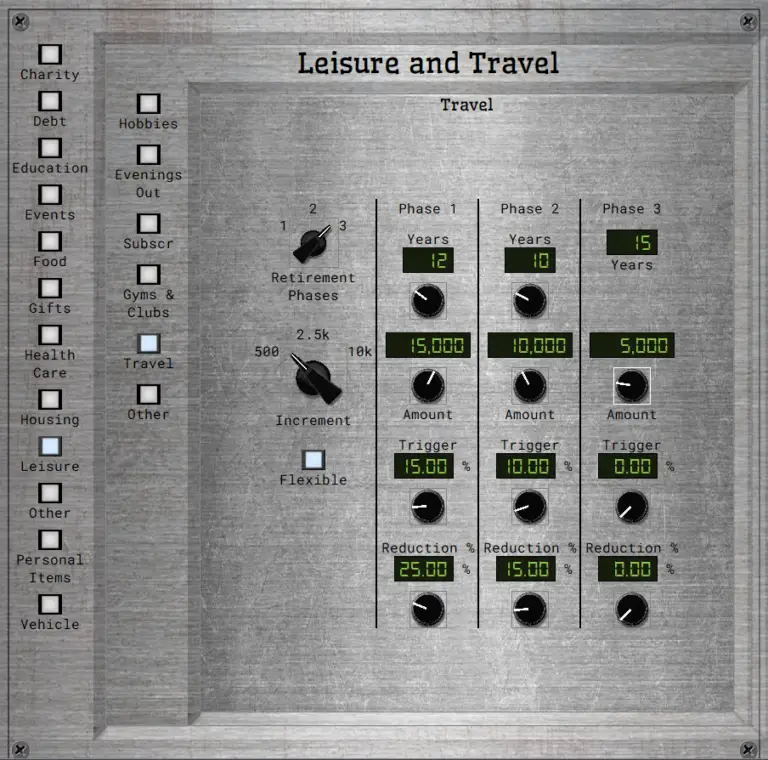
You probably won’t spend the same amount on travel every year — you may travel a lot at first, and less later. And when the stock market crashes, you might tighten your belt.
Rock My Retirement lets you control these details. For each recurring expense, you can divide your retirement into phases, budget different amounts for each phase, and trim when the market is down. For one-time expenses, you can trim if the market is down, defer until the market is back up, or keep it the same.
As you adjust your choices, Rock My Retirement’s graphs immediately show you how the adjustment changes your outcomes in all scenarios, so you’ll have clear information when you weigh the sacrifice against the benefit.
2. Data visualization that shows you the forest, not just the trees.
As you turn a knob or slide a fader, Rock My Retirement updates its easy-to-follow graphs in real time so that you can instantly see how even the smallest choices affect your retirement across all scenarios.
Like most good retirement planning tools, Rock My Retirement provides a line graph that simulates how your retirement assets will evolve if the economic conditions during your retirement resemble the conditions during some historical period. And you can choose different historical windows to see what conditions challenge you.
But a line graph can only show one scenario at a time. It can be difficult to envision how a change affects all simulations at once, especially when any given choice may make you better off in some conditions but worse off in other conditions. It’s easy to feel overwhelmed.
Rock My Retirement solves that problem by showing all the line graphs at once. Essentially, I take the two-dimensional graphs for every simulation and stack them together into a three-dimensional graph. You can instantly see how all scenarios are affected by even the slightest changes in your plans.
There are many trade-offs during retirement, and you make much better decisions — and have a much better retirement — when you can fully envision the costs and benefits of every option. Rock My Retirement empowers you to do just that.
3. First Class Monte Carlo Simulations.
Many retirement planners run Monte Carlo simulations. Few model the correlations between economic variables or capture multi-year trends like inflation cycles. Rock My Retirement does both.
Rock My Retirement’s Monte Carlo Engine allows you to run between 5,000 and 100,000 trials (simulations) to stress-test your retirement plan against real-world economic swings.
For each Monte Carlo trial, the Engine simulates hypothetical conditions across eleven economic variables:
* It draws random values for each variable based on historical means and standard deviations.
* It imposes real-world dependencies by applying a correlation matrix (derived using a Cholesky decomposition).
* It captures temporal dynamics with ARIMA models (Autoregressive Integrated Moving Average), reflecting dynamics such as multi-year inflation cycles and mean reversion in stock returns.
That produces a simulated economic scenario mirroring both empirical correlations and time-based trends.
Next, the Engine calculates:
* Every expense for every year based on your personal inputs and the simulated conditions.
* Portfolio growth for each asset class using the trial’s return series.
* Required minimum distributions (RMDs) for IRAs and 401ks.
* Roth conversion amounts.
* Social Security payments, accounting for excess earnings, delayed benefits, reductions for early withdrawals, and other nuances.
* Federal and state income taxes for every year.
* Withdrawals from accounts in the order you specify.
* Reinvestments of extra funds in the order you specify.
By running many thousands of trials, you see how your plan holds up under a broad variety of conditions.
But it doesn’t stop there. If you really want to dial up the stress, you can add “punishment” to each simulation — injecting an extra inflationary cycle or bear market of user-defined duration and severity — so you discover exactly how much volatility your retirement can endure.
4. AI That Finds Strategies — Not Just Answers Questions.
If you’ve looked at other retirement planning tools, you’ve probably seen the words “AI-powered” on their websites. Here’s what that usually means: they’ve connected a chatbot — the same technology behind ChatGPT — to their financial calculator. You ask it a question in plain English, it runs a scenario, and it explains the result back to you in plain English. The math hasn’t changed. The strategies haven’t improved. You just have a more conversational way to poke around.
Some tools go a step further and offer a Roth conversion “optimizer.” Under the hood, these typically use a greedy algorithm: they try filling each tax bracket one at a time, check whether a single number went up or down, and pick the bracket that looked best. They optimize one thing at a time, and they don’t consider how that choice interacts with your other strategies.
Rock My Retirement does something fundamentally different.
The problem it solves is this: your retirement strategies don’t operate in a vacuum. When you take Social Security, how you handle Roth conversions, which accounts you draw from, and where you reinvest surplus cash all interact in ways that are nearly impossible to reason about by hand. And there are so many possible combinations that you can’t just try them all out.
For example, in Rock My Retirement, you can choose strategies like:
* When you and your spouse will take Social Security.
* Whether to do a Roth conversion for your 401ks and IRAs.
* When to start your Roth conversion.
* Over how many years to handle the Roth conversion.
* Which accounts you will draw down to pay bills.
* Which accounts you will reinvest in when you have extra funds.
For a typical retiree, Rock My Retirement allows more than twenty nonillion possible combinations for these choices. That’s a 2 followed by 31 zeros. To try them all out, it would take a high-end desktop computer thousands of times longer than the universe has existed. There’s no practical way to find the best one.
And that’s when Rock My Retirement’s AI Optimization Engine says, “Hold my beer.”
To build the AI Optimization Engine, I created a genetic algorithm — a search technique inspired by natural selection.
Here’s the key: it doesn’t just try a massive number of random combinations and hope for the best. That would be brute force, and it wouldn’t get very far with twenty nonillion possibilities. Instead, the algorithm starts with a small population of random strategies, evaluates how well each one accomplishes your objectives, and then breeds a new generation by mixing and mutating the top performers. The next generation is smarter than the last. Strategies that worked well pass their traits forward. Strategies that didn’t are discarded. And with each generation, the algorithm gets better at predicting which combinations are worth exploring — for your specific circumstances, plans, and goals.
After hundreds of generations, it has learned an extraordinary amount about what works for you. It’s not following a script or filling in a tax bracket. It’s discovering strategies that emerge from the interactions between all of your choices — strategies you would almost certainly never stumble onto by hand.
One challenge is how to find a “better” solution when you have multiple competing goals. Of course, we all have multiple goals and priorities for our retirements, and the Engine will search for a solution that best matches yours under your unique circumstances. But here’s where things get complicated: If you have more than three competing goals, most genetic algorithms stall out.
So, I built an advanced variant called NSGA-III — a Non-dominated Sorting Genetic Algorithm III. NSGA-III was developed for exactly this class of problem: optimizing many competing objectives simultaneously. It’s the same family of algorithms used to design aircraft engines, plan satellite constellations, optimize military mission planning, and manage drug discovery pipelines — problems where there are many conflicting goals, enormous search spaces, and no single “right answer,” only trade-offs. When the stakes are that high, you don’t ask a chatbot.
Retirement planning is that kind of problem. You want to minimize risk, maximize what you leave behind, keep a cushion for emergencies, and maybe swing for the fences on upside — and these goals pull in different directions. NSGA-III is built for exactly that tension.
The Engine surfaces combinations of strategies you would almost certainly never find on your own — tailored to your priorities, tested against every overlapping window of real economic history, and ready for you to explore, compare, and adopt with a single click.
5. Refined Rental Property Projections.
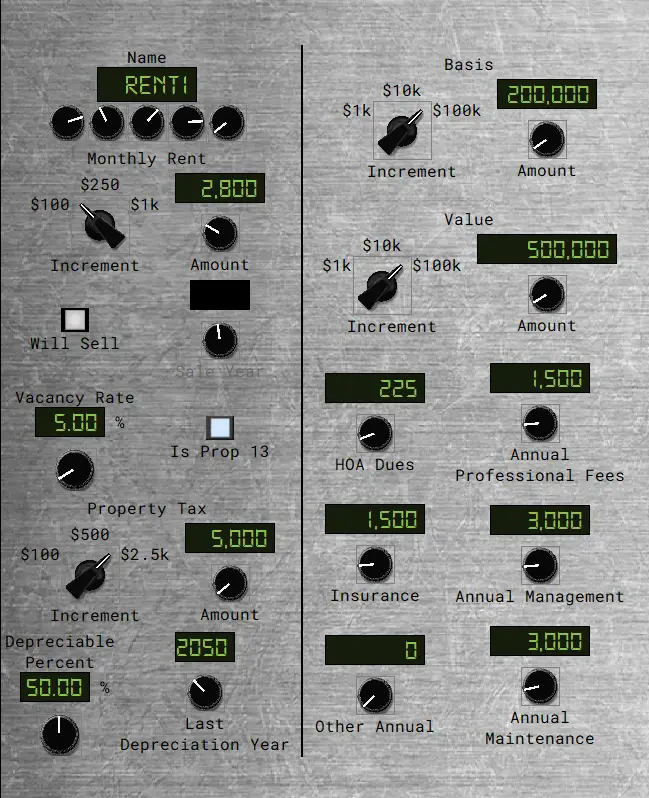
If you are a landlord, Rock My Retirement will perform detailed projections for your rental property expenses and income.
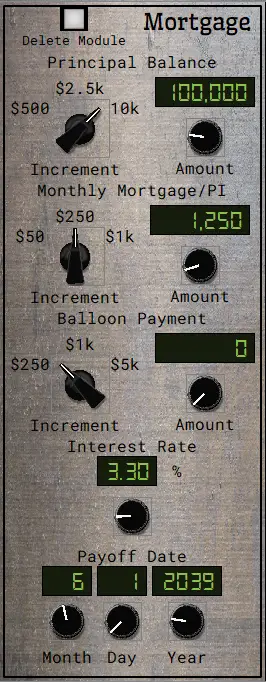
Rock My Retirement’s Rental Properties module lets you input detailed information about your rental properties — expenses, rents, mortgages, property taxes, and so on.
For each simulation, Rock My Retirement calculates yearly amounts to reflect inflation rates specific to rental properties. For example, rents have historically increased at rates that are different than the consumer price index and different than home value appreciation. Rock My Retirement projects your rents based on historical rent inflation, projects property taxes based on historical home value appreciation, and projects your other expenses based on historical CPI inflation.
Rock My Retirement also lets you plan to sell a rental property in the future. For the sale year, Rock My Retirement’s simulation will project the net proceeds, account for your estimated taxes, and reinvest the rest based on the reinvestment strategies you set.
You can input as many rental properties as you wish, and you set the details for each separately.
6. Roth Conversions Made Easy.
A Roth conversion strategy is actually quite simple, even though the math is complex. Rock My Retirement shows you just how easy it can be.
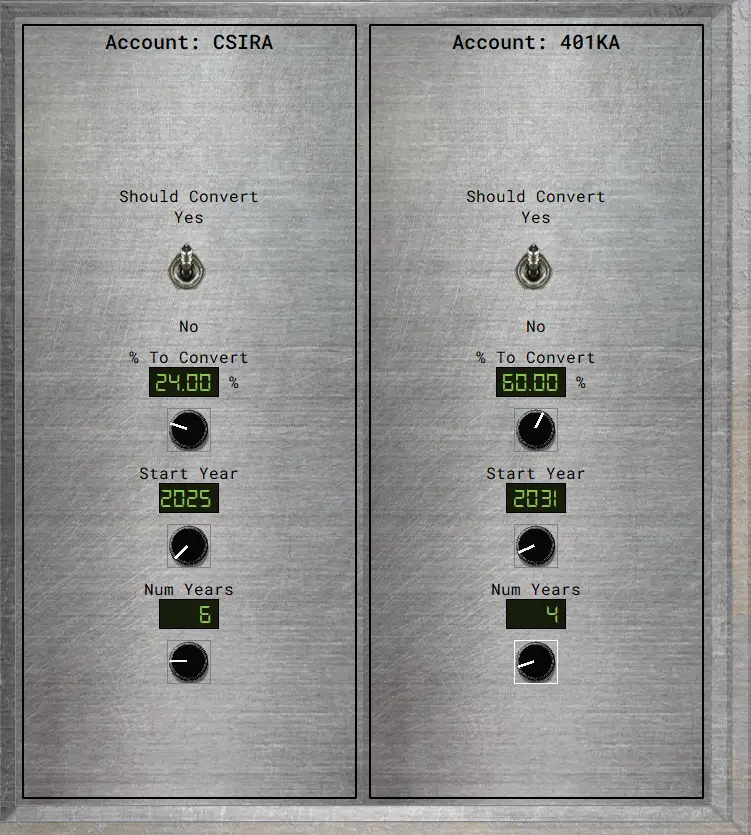
For each of your traditional IRAs and 401ks, Rock My Retirement lets you choose:
* Whether to do a Roth conversion.
* What portion of your current balance you want to convert.
* When you will start your conversion.
* How many years the conversion will take.
As you flip the switch and turn knobs, Rock My Retirement instantly does all the hard math behind the scenes and updates its graphs to show you how the changes affect your retirement in all simulations. It doesn’t overwhelm you with explanations, math, caveats, or lots of numbers. The results are what matter, and the results are what you get.
7. Contingency Planning.
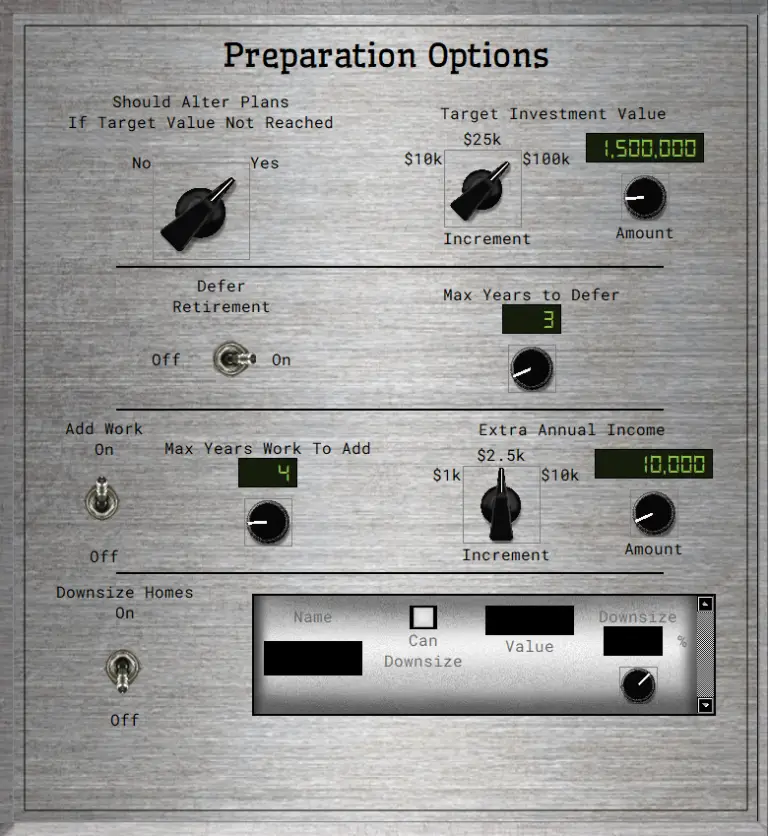
What if your retirement date rolls around and your assets are not as much as you hoped? Rock My Retirement’s simulations let you plan for that contingency.
You can tell Rock My Retirement whether you are willing to alter your plans if, in any simulation, your investments fail to reach a target amount. If you are, then you can decide whether to downsize your home, defer your retirement, or take on a side hussle until your investments reach your target.
8. Tax Estimates.
Rock My Retirement estimates your taxes for every year in each simulation and displays those estimates in easy-to-read graphs.
Rock My Retirement projects your ordinary income tax from part-time work, rental property income, 401k and IRA distributions, pensions, annuities, universal life insurance, Social Security, and more. It also projects your annual capital gains tax from brokerage accounts, property sales, and other sources. Rock My Retirement estimates federal and state taxes based on the brackets and other rules that vary based on your state of residence, such as the way they tax Social Security, pensions, and other retirement vehicles. (Rock My Retirement does not account for local income taxes, although I may add that in a future version.)
Of course, tax laws may change, and proper tax accounting depends on details that are far beyond the scope of any retirement planning software. But Rock My Retirement will give you a useful estimate that will ensure the simulations account for taxes as you plan your retirement.
9. “What if” Sandboxes.
Rock My Retirement lets you experiment with your retirement strategies using up to three “Sandboxes.” In each Sandbox, you can tinker with your strategies and plans to see how different choices affect the outcomes. You can easily switch between each Sandbox and your main data to see how the results compare. And if you prefer the results you’re getting in a Sandbox, you just click the “Implement” button to adopt the active Sandbox’s strategies and plans.
10. And So Much More.
Effective retirement planning must be thorough. I have spent three years building software that is as thorough as I know how to make it.
Now, “thorough” can sometimes mean “overwhelming and intimidating,” but Rock My Retirement makes the process simple, fun, and easy.
I’m proud of what I have made. I am confident that Rock My Retirement will help you plan a great retirement. It will make planning easy. It will make planning fun. It will give you the confidence to know when you can retire and what kind of retirement you can afford.
Because Vinyl's Not For Everyone.
I’m proud of Rock My Retirement. It is powerful and versatile. But it’s not for everyone.
Here are a few thoughts to help you decide whether Rock My Retirement is the right fit for you.
Where are you retiring?
Rock My Retirement is firmly rooted in the USA. That’s not just because I’m proud to be an American; it’s because I built the data and the math around the American experience. I project taxes based on the American tax system. I project inflation based on US historical data. And for your investments, my simulations are built upon the historical performance of US markets. None of this is valid for someone retiring elsewhere.
Mouse or keyboard?
Rock My Retirement has a one-of-a-kind user interface. I designed it to make retirement planning fun and to take the stress out of it. But there are no text entry boxes. The only time you’ll type is when you name your Save File. So, it’s best if you enjoy using your mouse. Of course, you can use <Tab> and the keyboard arrows to control widgets, and for many of the knobs, I give you the option of double-clicking on the display to enter a value using your keyboard. But the “fun and calm” vibes work best with a mouse.
Highly specialized financial strategies?
Rock My Retirement does not support highly specialized financial strategies like options trading, leveraged ETFs, or dynamic asset rotation models. If your retirement plan hinges on tactical market maneuvers, this may not be the ideal tool.
Crypto or international stocks?
I can only create useful simulations if I have roughly a hundred years of useful data. And there are some asset classes for which I just can’t get that much useful data.
Crypto is the most obvious culprit, because it hasn’t been around long enough. So, if you plan to rely significantly on crypto to fund your retirement, I cannot give you intelligent projections. I believe no software can, but I’m not going to dump on other people’s software. I’ll simply tell you candidly that I can’t do it, so I don’t pretend I can.
International stocks is another problematic asset class. I’m not saying they are a bad investment; I’m just saying that there are significant challenges in modeling international stock performance based on the available data. And if I can’t do it right, I’m not going to pretend I can. There are other software titles out there that model performance of international stocks. If you’re going to rely on international stocks as a significant component of your portfolio, you’ll want to decide whether you would prefer software that attempts to model their performance, or whether you’re comfortable lumping those assets in with an asset class that I do model.
Other common asset classes I do not model: REITs, commodities other than gold and silver, private equity, and venture capital.
Government retirement benefits from other countries?
Rock My Retirement models Social Security benefits under the US system. If you will get a comparable benefit from another country, Rock My Retirement will not provide meaningful forecasts for that benefit.
Custom Tax Regimes or Estate Planning Scenarios?
Rock My Retirement keeps things streamlined. This means no custom tax overlays, estate transfer simulations, or multi-generational wealth models. Just clean projections built on reliable US data.
Accessibility needs?
I built Rock My Retirement’s interface to be clear and calming. However, it doesn’t include accessibility tools like screen reader optimization. As for keyboard-only navigation, you can do a lot with your keyboard instead of a mouse, but the streamlined UI is less optimal for keyboard-only use than what you’ll find in some other retirement planning tools.
This Console Doesn't Phone Home.
There are bad people in the world.
They want your account information so they can steal your money.
I take that seriously.
We have all heard of retirees getting their nest eggs stolen by scammers or hackers. I absolutely refuse to be the means by which someone does that to you.
Local Only Software, Always.
My approach to data security is simple and foolproof: No one can steal your data from me if I don’t have your data. So, I refuse to have your data beyond the simple info necessary for you to have an account (name and e-mail address).
Rock My Retirement is software that you download, and it runs locally on your computer. It is not a web app, and it is not running in the cloud.
Your Financial Data Stays With You.
When you input your financial information into Rock My Retirement, the only place that information will ever exist is on your computer. It never gets to me. In fact, the only times your local copy of the program will communicate with my server are:
(a) sometimes when you start the program, it will ask my server to verify that your license is valid and that you are using the software on a properly registered computer; and
(b) the program will periodically check for software updates and install them. The program never transmits any of the financial information that you input into Rock My Retirement.
Save Files Stay Private.
Rock My Retirement lets you save the information you input into a Save File. You choose where on your local machine to store that file. It does not get saved on my servers or otherwise sent to me.
Of course, some hacker might hack your home network and access the Save File on your computer. But even then, I have ensured that the Save File does not include any identifying information about you or your accounts. In Rock My Retirement, you can give your accounts a five-character name for your own ease of reference, but Rock My Retirement never asks for the names of your financial institutions, account numbers, or any identifying information. So, even if someone hacks into your local computer and steals your Save File, they won’t be able to identify your accounts. They can’t steal what isn’t there.
Minimal License Data, Maximum Protection.
Of course, when you purchase a license, I do keep only the most necessary information about you to maintain your license. I store your name and e-mail address, license number, basic identifying information about the computer you are registering to use the software, and the general geographical region in which that computer is located (not addresses or anything specific). I use that information only to validate your use of the software. I keep that license information encrypted, and I do not share it with anyone or sell it to anyone.
Why Rock My Retirement Won’t Auto-Fetch Your Account Balances.
This rather extreme approach to safety and security does create one inconvenience: It means I can’t include a feature that would let Rock My Retirement get your account balances, allocations, etc. over the internet from your financial institutions so that you don’t have to enter that information manually. Yes, I realize it can be less convenient for you to manually pull and update those numbers. But while I value your convenience, I would be mortified if some hacker somehow used my software to steal your money. And I’m not willing to take that chance.
So, when you manually update your information in Rock My Retirement, rest easy knowing Rock My Retirement keeps your account identifying information locked down — by never having it in the first place.
Rig Rundown.
I have battle tested Rock My Retirement on various Windows 11 PCs. It likes Windows 11. If you’re on Windows 10, it’s time to get rid of the flip phone, trade in your parachute pants, and update your operating system.
If you have a Mac, shame on you. I do not support Apple products, technically or philosophically. You might get Rock My Retirement to work with a third-party emulator or virtualization tool, but you are on your own. Any cult-OS-induced meltdowns are outside the scope of my support.
And if you’re on Linux, well, good luck. Maybe clone the repo, compile from source, wage war on dependencies, and let me know how that turns out. I admire you, but I have no idea whether you can get Rock My Retirement to run on your Linux machine, and I don’t provide technical support for the Linux environment.
For those on Windows 11:
Ironically, it takes a reasonably robust PC to pretend that it’s analog. Rock My Retirement does an enormous amount of math under the hood, and it has to be fast enough to keep the graphs updating in real time as you turn the knobs and slide the faders. So, if your CPU is too slow or your RAM is too anemic, the user interface will be very laggy and you will not enjoy Rock My Retirement. Take the technical requirements seriously. And if your PC isn’t up to snuff, then either buy a better one or maybe try one of the other retirement planning tools that accommodates lower-spec’d machines.
Minimum
Recommended
Operating System
Windows 11
Windows 11
CPU
2-core @2.4 GHz
6-core @3.0 GHz
RAM
6 GB
8 GB
Disk Space
1 GB
1 GB, SSD preferred
Open Patch Bay, Route As Needed.
I have a message for Consumers and a message for Professional Advisors.
To Consumers:
If you are a DIY retirement planner, Rock My Retirement is a valuable tool, but experts can still add perspective. Be humble enough to know when you could use an expert’s guidance. Here are a few examples of reasons you might consider hiring a Certified Financial Planner.
Unmodeled Assets: Specialized Assets Need Specialist Forecasting.
You may have unusual circumstances that Rock My Retirement does not handle. For example, Rock My Retirement cannot simulate future returns on asset classes that do not have a long, clear track record — Crypto has not been around long enough to have a solid base of historical data, and I have no reliable data source on historical returns for your art collection, vacant land, or the publishing rights to the song you wrote. If you are planning a retirement that relies on things I don’t model, then you should definitely hire a professional to help you fill in those blanks.
Unknown Unknowns: An expert can spot hidden risks and opportunities.
You don’t know what you don’t know. No matter how good of a job you do with good retirement planning software (Rock My Retirement or otherwise), an expert may see things you missed. So, at least as a sanity check, you may want to bounce your plans off an expert.
Emotional Support: “Everyone has a plan, until they get punched in the mouth.” (Mike Tyson)
No software can give you the personal interaction that a professional can. And sometimes that is really important. No matter how good of a plan you have, that plan is worthless if you deviate from the plan in moments of fear. If the stock market crashes and you are tempted to panic sell, your greatest resource may be an expert you trust who talks you off the ledge and persuades you to stick with the plan.
If you wish to engage a professional, please ensure you hire a Certified Financial Planner. Anyone can give themselves the title “Financial Planner.” That title has no meaning. Very often, people who call themselves “Financial Planners” are really just insurance salespersons who do not owe you a fiduciary duty. The phrase “Certified Financial Planner” is a regulated designation (a trademark of the Certified Financial Planner Board of Standards, Inc.), and Certified Financial Planners have a fiduciary duty to act in your interest. That’s what you want. (I am not a Certified Financial Planner and I have no financial interest in you using one. But I do think they can help you.)
To Professional Advisors:
Rock My Retirement lacks the features you would want in your go-to software. It doesn’t have a client portal, and it doesn’t print reports or otherwise provide the kind of presentation material you would want to show your clients.
With that said, you are welcome to use the software in your business if you find it helpful. Perhaps you have another program that is your primary software, but you would like to run projections using Rock My Retirement’s Rental Properties module, or compare my Monte Carlo results to theirs, or see what ideas the AI Optimization Engine comes up with. That’s totally fine.
If you purchase a license for Rock My Retirement, I don’t charge extra just because you are a financial planner. It’s the same price I charge everyone else.
If you buy a license, feel free to use the software to help as many of your clients as you wish. You are welcome to create a separate “Save” file for as many clients as you wish. The only limitations are the ones I set for all users. Worth noting:
(a) The license is for an individual, not a company. Any individual who uses the software needs their own license in their own name. (But that individual can have as many separate save files as they like, so you can have a separate save file for each of your clients if you wish.) So, if there are five people in your office who want to use Rock My Retirement, each of them would need a separate license.
(b) You cannot give a copy of the software to your clients. If one of your clients would like the software, they would need their own license. However, if you both have a license, you are free to exchange Save Files.
If there are enough advisors that would like a version of the software tailored for professionals, I might consider doing it. Feel free to let me know if you would be interested in that by sending an e-mail to [email protected]